
Free 2027 Planner: Printable Monthly Planner (PDF)
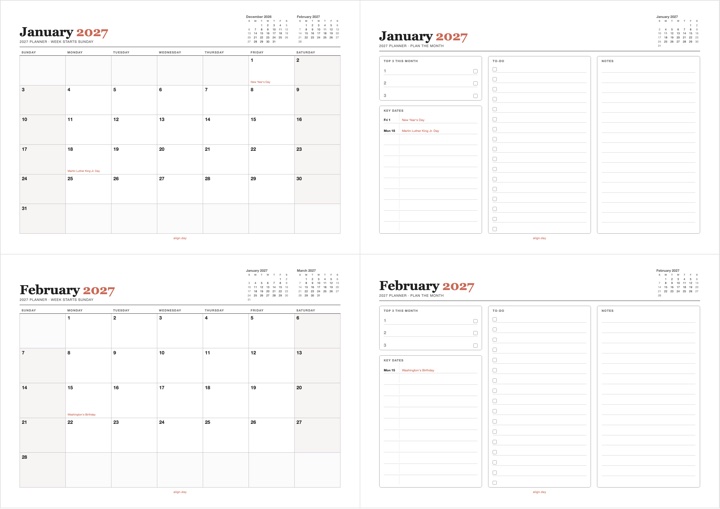
A printable 2027 monthly planner: a year-at-a-glance page, then two pages for every month of 2027. Each dated month grid faces a plan page for the month's top 3, key dates, to-dos and notes. Free download, no signup.
PDF 25 pages · A4 landscape, prints on Letter
Download 2027 Planner PDF →What's included
- A 2027 year at a glance on page 1, with every US federal holiday of 2027 listed below the months
- Two pages per month, January to December 2027:
- a dated month grid with weeks starting on Sunday, a large box for every day, holidays printed small in their box, and the previous and next months beside the heading
- a plan page with the month's Top 3, a Key dates list with that month's federal holidays already written in, a to-do list with checkboxes, and notes
- 25 A4 landscape pages that print on US Letter, in light, ink-friendly gray. Print the whole PDF double-sided with "Flip on short edge", starting from page 1, and bind it on the left: each month's grid then faces its plan page. For a single month, print its two pages single-sided and lay them side by side.
The 2027 calendar has the same dated month grids without the plan pages, if you only need to see dates. For a page per week with hours to fill in, use the 2027 Weekly Planner. For a month grid you can reuse in any year, use the undated Monthly Time Blocking Calendar.
US federal holidays in 2027
- New Year's Day: Friday, January 1
- Martin Luther King Jr. Day: Monday, January 18
- Washington's Birthday: Monday, February 15
- Memorial Day: Monday, May 31
- Juneteenth: Saturday, June 19 (observed Friday, June 18)
- Independence Day: Sunday, July 4 (observed Monday, July 5)
- Labor Day: Monday, September 6
- Columbus Day: Monday, October 11
- Veterans Day: Thursday, November 11
- Thanksgiving Day: Thursday, November 25
- Christmas Day: Saturday, December 25 (observed Friday, December 24)
A federal holiday that falls on a Saturday is observed on the Friday before, and one on a Sunday on the Monday after. The planner marks both the official and the observed day for each holiday dated in 2027. New Year's Day 2028 falls on a Saturday, so it is observed on Friday, December 31, 2027, which the planner leaves blank: write it in if you plan a year-end closure.
How to plan 2027 month by month
A calendar shows what is already fixed. A planner decides what the month is for. Spend ten minutes on the plan page before each month starts, and the month grid next to it shows when the work can happen.
- Mark the year's fixed dates. Circle trips, school breaks, launches and family events on the year at a glance.
- Pick the month's top 3. Write the three results that would make the month a good one. Three is enough to finish; ten is a wish list.
- Fill in the key dates and the grid. Add deadlines, appointments and birthdays to Key dates, then write each in its day box.
- List the to-dos. Break each top-3 result into tasks, and give the biggest ones a day on the grid.
- Plan each week. Each Sunday, move the week's tasks and dates into a weekly planner and give them their hours.
- Review at the end of the month. Tick what got done, write what you learned in Notes, and carry what slipped to next month's plan page.
Example: a filled-in January 2027 plan page
| Field on the plan page | What you write |
|---|---|
| Top 3 · 1 | Finish the Q1 budget |
| Top 3 · 2 | Book the spring break trip |
| Top 3 · 3 | Run three times a week |
| Key dates · Fri 1 | New Year's Day is printed · day off |
| Key dates · Mon 4 | First day back at work |
| Key dates · Mon 18 | Martin Luther King Jr. Day is printed · day off |
| Key dates · Fri 29 | Q1 budget due |
| To-do | ☐ Collect last year's spending · ☐ Draft the budget · ☐ Compare three trip dates · ☐ Book flights |
| Notes | Mondays are full of meetings: do the budget work on Tuesday and Thursday mornings |
On the January grid next to it, the budget deadline goes in Fri, Jan 29, and the two days off are already printed. The plan page says what January is for; the grid shows that the budget has four working weeks.
If your plans move after you print, Align shows your calendar events next to your time blocks on a visual timeline on your iPhone.

