
Free Daily Schedule Template (Printable PDF)
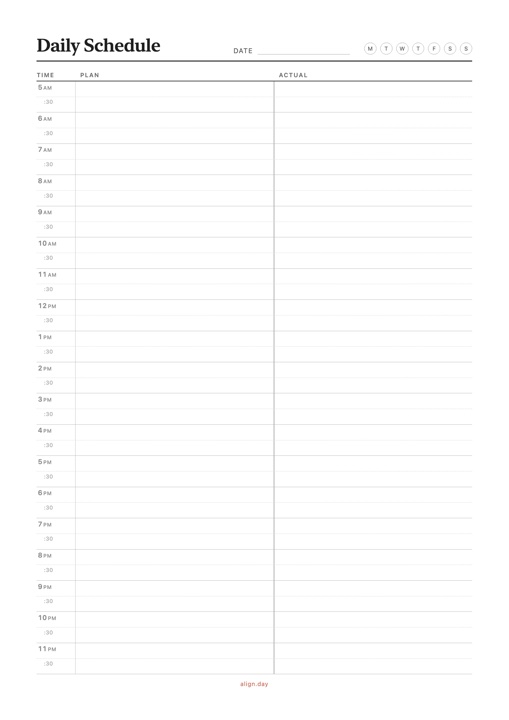
A printable daily schedule with half-hour rows from 5 AM to midnight and two columns, Plan and Actual, so you can compare the day you planned with the day you had. Free download, no signup.
PDF 1 page · A4, prints on Letter
Download Daily Schedule PDF →What's included
- Half-hour rows from 5 AM to midnight, 38 rows in all
- A Plan column for the schedule you set in the morning
- An Actual column for what really happened, right beside it
- A blank header: write the date and circle the weekday
- One A4 page that prints on US Letter, in light, ink-friendly gray
Want to plan every hour of the day and night? The daily time blocking template covers all 24 hours in 15-minute rows.
How to use a daily schedule template
Most schedules only show the plan. This one keeps a second column for the day you actually had, which is how you learn how long things really take.
- Write the plan in the morning. Fixed commitments first, then your priorities, then meals, breaks and travel.
- Leave a buffer. One open half hour in the morning and one in the afternoon absorbs most overruns.
- Fill in Actual as you go. A quick note at lunch and one in the evening is enough. Write what happened, not what should have.
- Compare the columns. Rows where the two differ show which tasks run long and when interruptions arrive.
- Adjust tomorrow. Give a task that ran over a longer slot, and move focused work away from the half hours that keep getting interrupted.
Daily schedule examples
Two filled-in daily schedules: a workday at the office and a day at home. Each row is a half hour on the sheet; rows that only continue the block above them are left out.
Example 1: a workday
| Time | Plan | Actual |
|---|---|---|
| 6:00 AM | Wake up, shower | Wake up, shower |
| 6:30 AM | Breakfast | Breakfast |
| 7:00 AM | Commute | Commute, train delayed |
| 7:30 AM | Commute | Commute |
| 8:00 AM | Email and messages | Arrived, email |
| 8:30 AM | Write the project update | Email ran over |
| 9:00 AM | Write the project update | Project update |
| 9:30 AM | Write the project update | Project update |
| 10:00 AM | Team meeting | Team meeting |
| 10:30 AM | Buffer | Finished the project update |
| 11:00 AM | Prepare client slides | Prepare client slides |
| 11:30 AM | Prepare client slides | Colleague asked for help |
| 12:00 PM | Lunch | Lunch |
| 12:30 PM | Walk | Prepare client slides |
| 1:00 PM | Client call | Client call |
| 2:00 PM | Review the budget | Review the budget |
| 3:00 PM | Buffer | Follow-ups from the client call |
| 3:30 PM | Plan tomorrow | Plan tomorrow |
| 4:00 PM | Commute | Commute |
| 5:00 PM | Gym | Gym |
| 6:30 PM | Dinner | Dinner |
| 7:30 PM | Free time | Free time |
| 10:00 PM | Wind down | Phone in bed |
| 10:30 PM | Sleep | Sleep at 11:15 |
What the Actual column shows: email took an hour, not half of one, and the morning buffer went to finishing the update. The walk was lost to the slides. Tomorrow's plan: an hour for email and the project work starting at 9.
Example 2: a day at home
| Time | Plan | Actual |
|---|---|---|
| 7:00 AM | Wake up, coffee | Wake up, coffee |
| 7:30 AM | Breakfast with the kids | Breakfast with the kids |
| 8:00 AM | School drop-off | School drop-off |
| 8:30 AM | Laundry, tidy the kitchen | Laundry, tidy the kitchen |
| 9:00 AM | Pay bills, call the insurer | Pay bills |
| 9:30 AM | Grocery list, order online | Insurer call, on hold |
| 10:00 AM | Yoga class | Yoga class |
| 11:00 AM | Clear out the garage | Grocery order |
| 11:30 AM | Clear out the garage | Clear out the garage |
| 12:30 PM | Lunch | Lunch |
| 1:00 PM | Read | Phone, scrolling |
| 2:00 PM | Batch cook for the week | Batch cook for the week |
| 3:00 PM | School pick-up | School pick-up |
| 3:30 PM | Homework help | Homework help |
| 4:30 PM | Park with the kids | Park with the kids |
| 6:00 PM | Dinner | Dinner |
| 7:00 PM | Bath and bedtime | Bath and bedtime |
| 8:00 PM | Movie | Movie |
| 10:00 PM | Sleep | Sleep |
What the Actual column shows: the insurer call pushed the grocery order back and took half the garage time, and the reading hour went to the phone. Next time: calls go in their own half hour with a buffer after them, and the phone stays in another room during the reading slot.
If you keep the plan on your phone instead, Align puts your time blocks on a visual timeline next to your calendar events, and you can drag a block when the day changes.

