
Free 2027 Digital Planner for iPad (Hyperlinked PDF)
A dated 2027 digital planner for iPad with working links: month tabs on every page, a year page, twelve month pages and 53 week pages with an hourly time-block grid. Free download, no signup.
PDF 66 linked pages · 4:3 landscape for iPad, prints on Letter
Download 2027 Digital Planner PDF →What's included
- 66 linked pages in 4:3 landscape, sized for iPad
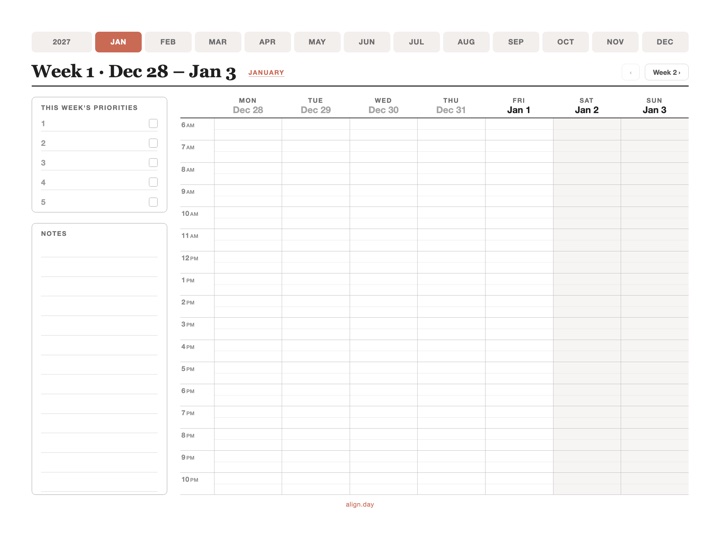
- A row of tabs on every page, for 2027 and each of the twelve months, with the current month highlighted
- A 2027 year page where every month name opens its month, and every week number and date opens its week
- Twelve month pages with a large box for every day, a Goals this month box and notes, where the Week button at the left of each row opens its week page
- 53 dated week pages, from Monday, Dec 28, 2026 to Sunday, Jan 2, 2028, with one row per hour from 6 AM to 10 PM, a This week's priorities box and notes
- Week › and ‹ Week links on every week page, and a link back to its month
- Light, ink-friendly gray that also prints on US Letter or A4
The planner has no daily pages: each week page gives every day its own column of hours.
Planning on paper instead? The 2027 weekly planner has the same hourly week grid on A4 landscape pages, without links or month pages.
How to import the planner into GoodNotes or Notability
- Download the PDF on your iPad and save it to Files.
- GoodNotes: tap New, choose Import and pick the PDF. Notability: in the library, press and hold + New, choose Import and pick the PDF. Or open the PDF in Files, tap Share and choose the app.
- Tap a tab to jump. If a tap writes instead of jumping, switch the app to its read-only or view mode, tap the link, then switch back to write.
The planner is a plain PDF, so it works in any PDF app that lets you write on pages. GoodNotes and Notability are not affiliated with Align.
How to use a digital planner for time blocking
A digital planner works like a paper one, with one advantage: you jump to any month or week with a tap instead of flipping pages.
- Start on the month. Tap the month's tab, write up to five goals for the month, and mark fixed dates in their day boxes.
- Open the week. Tap the Week button at the left of the week's row to jump to its page and write up to five priorities for the week.
- Block fixed commitments first. Classes, meetings, commutes and appointments go into their hours.
- Give each priority a block. Put the work that needs focus where you focus best, and spread big tasks across several days.
- Review at the end of the week. Tick off what you finished, tap Week › and carry anything that slipped to the next page.
Example: February and week 6 filled in (Feb 1 – Feb 7)
On the February 2027 page:
- Goals this month: 1 submit the thesis chapter draft · 2 apply to three summer internships · 3 run twice a week
- Day boxes: Feb 12, "Chapter draft due" · Feb 19, "Internship deadline" · Feb 26, "Dentist, 4 PM"
Tapping Week 6 opens the Week 6 · Feb 1 – Feb 7 page:
- This week's priorities: 1 write the chapter's methods section · 2 polish the CV · 3 two runs · 4 book the dentist
| Time | Mon | Tue | Wed | Thu | Fri | Sat | Sun |
|---|---|---|---|---|---|---|---|
| 7 AM | Run | — | Run | — | — | Long breakfast | — |
| 9 AM | Methods section | Lecture | Methods section | Lecture | Methods section | Groceries | — |
| 1 PM | Lab | Lab | Lab | Lab | Polish CV | Open | Family lunch |
| 3 PM | Email · book the dentist | Seminar | Open hour | Office hours | CV to careers office | — | — |
| 7 PM | Dinner | Reading | Dinner with friends | Reading | Open | — | Plan week 7 |
The example shows five of the 17 hours. The month's goals become the week's priorities: three mornings go to the chapter that's due on Feb 12, and the CV gets Friday afternoon so it is ready two weeks before the internship deadline.
If you'd rather move blocks than erase them, Align keeps your time blocks on a visual timeline and syncs them across iPhone, iPad and Mac via iCloud.
Frequently asked questions
Is the 2027 digital planner free?
Yes. The 2027 digital planner PDF is completely free. There is no signup and no email required. Click the download link and import the file into your note-taking app.
How do I import the digital planner into GoodNotes or Notability?
Download the PDF on your iPad and save it to Files. In GoodNotes, tap New, choose Import and pick the PDF. In Notability, open the library, press and hold + New, choose Import and pick the PDF. You can also open the PDF in Files, tap Share and choose either app. GoodNotes and Notability are not affiliated with Align; the planner is a plain PDF that works in any PDF app.
Do the links inside the PDF work?
Yes. Every page has a row of tabs for 2027 and the twelve months. On the year page, each month name opens its month and each week number or date opens its week. On a month page, the Week button at the left of each row opens that week's page, and every week page links back to its month and to the weeks before and after. Links work in PDF apps that follow links inside a PDF, such as GoodNotes and Notability. If a tap writes instead of jumping, switch the app to its read-only or view mode first.
How is the digital planner different from the 2027 weekly planner?
The digital planner is made for a screen: its pages are 4:3 landscape, sized for iPad, and it adds month tabs on every page, twelve month pages with a goals box, and links between the year, the months and the weeks. The 2027 weekly planner is made for paper: A4 landscape pages with a year page and 53 weeks, and no links or month pages. The week pages share the same 6 AM to 10 PM time-block grid.
Which dates does the 2027 digital planner cover?
All of 2027. It has 53 Monday-to-Sunday week pages, from Monday, December 28, 2026 to Sunday, January 2, 2028, so January 1 and December 31 each sit in a full week. Weeks are numbered 1 to 53 in order and don't follow ISO week numbers.
Can I print the digital planner?
Yes. Each page is 276 x 207 mm with 12 mm margins, so it fits on US Letter and A4 paper in landscape without clipping. Choose "Fit to page" if your printer adds its own margins.
Does the digital planner have daily pages?
No. This version has a year page, twelve month pages and 53 week pages. Each week page gives every day its own column with one row per hour, which is where you plan each day.

