
Free Eisenhower Matrix Template (Printable PDF)
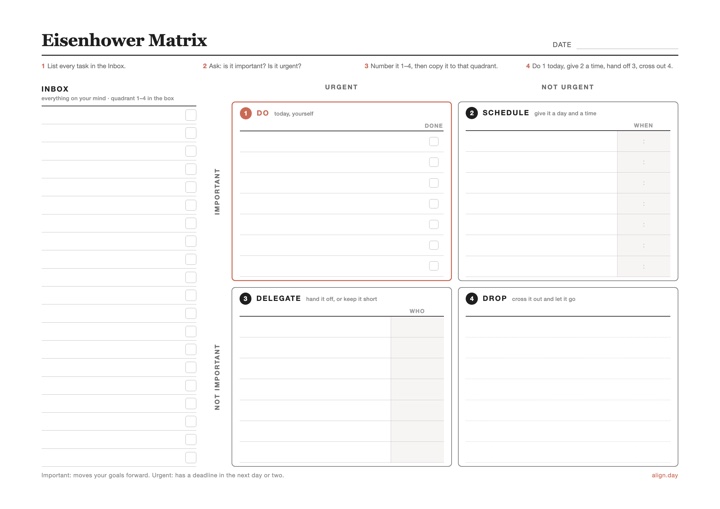
A printable Eisenhower matrix with an Inbox column to list your tasks first, then the four quadrants to sort them into: do, schedule, delegate and drop. One landscape page. Free download, no signup.
PDF 1 page · A4 landscape, prints on Letter
Download Eisenhower Matrix PDF →What's included
- An Inbox column with 20 lines to list tasks before you sort them, each with a box for its quadrant number
- The four quadrants, with Urgent and Not urgent across the top and Important and Not important down the side
- 1 Do with a Done box on each line, 2 Schedule with a When column, 3 Delegate with a Who column, and 4 Drop
- Seven lines in each quadrant, a Date field and a four-step how-to at the top
- One A4 landscape page that prints on US Letter, in light, ink-friendly gray
How the four quadrants work
The Eisenhower matrix, also called the time management matrix or priority matrix, sorts tasks with two questions. Is it important? Does it move your goals, work or relationships forward? Is it urgent? Is there a deadline in the next day or two, or someone waiting right now? The answers put every task in one of four boxes, and each box tells you what to do with it:
- Do: important and urgent. Deadlines and real problems. Do them today, yourself.
- Schedule: important, not urgent. Planning, learning, health appointments, the project that matters but has no deadline yet. These are the tasks that slip, so give each one a day and a time in the When column.
- Delegate: urgent, not important. Most interruptions, some meetings and requests that other people could handle. Write who takes it in the Who column, or keep it as short as you can.
- Drop: neither. Cross it out. If it keeps coming back, it may belong in another quadrant.
Quadrant 2 is the one that changes your weeks. A task with a When time is a time block, not a wish.
How to use the Eisenhower matrix template
- Empty your head into the Inbox. Write every task on your mind, big and small, without sorting.
- Ask the two questions for each task and write its quadrant number, 1 to 4, in the box at the end of the line.
- Copy each task into its quadrant. If quadrant 1 fills up, check again: some of those tasks are probably only urgent.
- Do quadrant 1 today and tick the Done box as each one is finished.
- Give every quadrant 2 task a When. Write a day and a start time, then put it on your calendar or a weekly planner.
- Hand off quadrant 3 and write the person's name under Who. Cross out quadrant 4.
Example: sorting a Monday morning
Date: Mon 7 Dec
Inbox
| Task | Quadrant |
|---|---|
| Fix the broken checkout link on the website | 1 |
| Send the client the signed contract | 1 |
| Prepare Wednesday's board presentation | 1 |
| Write next quarter's marketing plan | 2 |
| Book the annual checkup | 2 |
| Learn the new reporting tool | 2 |
| Reply to the vendor survey | 3 |
| Order snacks for Friday's team lunch | 3 |
| Collect expense receipts for the team | 3 |
| Reorganize the shared drive folders | 4 |
| Read the backlog of newsletters | 4 |
1 Do
| Task | Done |
|---|---|
| Fix the broken checkout link on the website | ☑ |
| Send the client the signed contract | ☑ |
| Prepare Wednesday's board presentation | ☐ |
2 Schedule
| Task | When |
|---|---|
| Write next quarter's marketing plan | Tue 9:00 |
| Book the annual checkup | Wed 12:30 |
| Learn the new reporting tool | Fri 2:00 |
3 Delegate
| Task | Who |
|---|---|
| Reply to the vendor survey | Priya |
| Order snacks for Friday's team lunch | Office team |
| Collect expense receipts for the team | Marco |
4 Drop
| Task |
|---|
The board presentation is due Wednesday, two days away, so it is urgent and important and stays in Do. The marketing plan has no deadline this week, which is exactly why it gets a fixed slot on Tuesday morning: without one, quadrant 1 would fill every day until the plan was late.
In Align, each quadrant 2 task can be a time block on your timeline, recurring if it happens every week, with a reminder before it starts.
More printable templates
Frequently asked questions
Is the Eisenhower matrix template free?
Yes. The PDF is completely free. There is no signup and no email required. Download it and print as many copies as you need.
What is on the Eisenhower matrix page?
One A4 landscape page. On the left, an Inbox column with 20 lines, each with a box for its quadrant number. On the right, the four quadrants with Urgent and Not urgent across the top and Important and Not important down the side: 1 Do with a Done box on each line, 2 Schedule with a When column, 3 Delegate with a Who column, and 4 Drop. Each quadrant has seven lines.
How is it different from the to-do list template?
The to-do list template is one long list where you circle a priority, A, B or C, and give each task its minutes and a start time. The Eisenhower matrix sorts tasks by two questions instead, important and urgent, into four boxes that each say what to do next: do it, schedule it, delegate it or drop it. Use the matrix to decide what deserves time, and the to-do list template to plan the day once you know.
Is a time management matrix the same as an Eisenhower matrix?
Yes. Time management matrix, priority matrix and urgent-important matrix are other names for the same four-quadrant grid. This template works as any of them.
What is the difference between important and urgent?
Important tasks move your goals, work or relationships forward. Urgent tasks have a deadline in the next day or two, or someone waiting on them right now. A task can be both, one, or neither, and that decides its quadrant.
Can I print it on US Letter paper?
Yes. The page is A4 landscape with wide margins, so it prints on US Letter too. Choose "Fit to page" in the print dialog if your printer adds its own margins.
Can I use it on my iPad?
Yes. Open the PDF in GoodNotes, Notability, or any PDF annotation app and write on it with your Apple Pencil or finger.

