
Free Employee Schedule Template (Printable PDF)
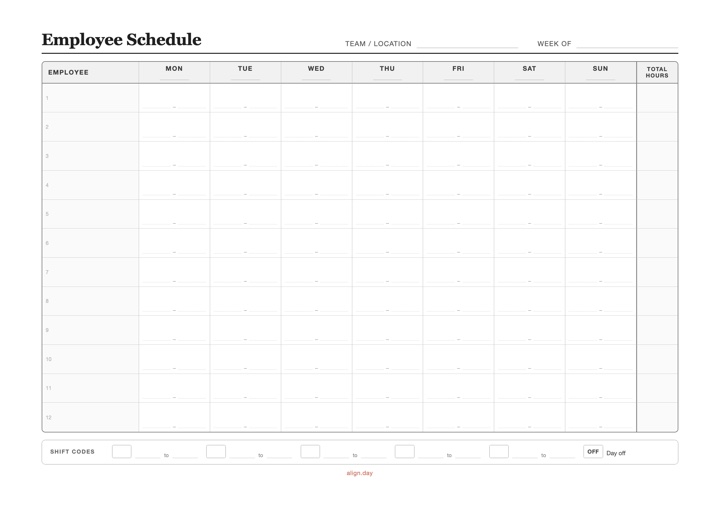
A weekly roster for up to 12 people on one landscape page: a shift cell for every person and day, a total-hours column and a legend for your shift codes. Free download, no signup.
PDF 1 page · A4 landscape, prints on Letter
Download Employee Schedule PDF →What's included
- 12 rows for employee names, numbered
- Monday to Sunday columns, each with a line for the date
- A shift cell for every person and day, with room for a start and an end time or a shift code
- A total-hours column for each person's week
- A shift code legend with five codes of your own and their times, plus OFF for a day off
- Lines for the team or location and the week
- Undated: start any week
- One A4 landscape page that prints on US Letter, in light, ink-friendly gray
How to make an employee schedule
An employee schedule template answers one question for everyone on the team: when am I working this week? Build it the same way every week and people learn to read it at a glance.
- Define your shifts first. Give each regular shift a code and its times in the legend. Codes keep the cells readable.
- List the team, one name per row.
- Cover each day before you balance hours. Go day by day and make sure every shift you need has someone in it.
- Write OFF on days off, so a blank cell always means "not decided yet".
- Total each row and check it against each person's contracted hours.
- Post it before the week starts, and write changes on the sheet, so there is only one version.
Example: a week at a café on the employee schedule
Team / location: Corner Café · Week of Mar 1
Shift codes: O = 6 AM to 2 PM · M = 10 AM to 6 PM · C = 2 PM to 10 PM · OFF = day off
| Employee | Mon | Tue | Wed | Thu | Fri | Sat | Sun | Total hours |
|---|---|---|---|---|---|---|---|---|
| Ana | O | O | O | O | O | OFF | OFF | 40 |
| Ben | OFF | OFF | C | C | C | C | C | 40 |
| Chloe | C | C | OFF | OFF | O | O | O | 40 |
| Dev | OFF | M | M | OFF | OFF | 9 AM – 1 PM | 9 AM – 1 PM | 24 |
| Erin | M | M | OFF | OFF | M | M | M | 40 |
The example uses five of the 12 rows, and the totals count the full length of each shift. Every day has someone to open and someone to close, Dev's weekend mornings are written in full because they don't match a code, and Thursday, the quietest day, runs on just the opener and the closer.
For one person's week instead of a team's, use the weekly schedule template or the weekly work schedule template.
Align plans one person's day and isn't a team scheduling tool, but if you're the one who receives the roster, Align lets you add your shifts as recurring time blocks on your iPhone and plan the rest of your day around them.
Frequently asked questions
Is the employee schedule template free?
Yes. The employee schedule PDF is completely free. There is no signup and no email required. Click the download link and print a sheet for every week.
What does the employee schedule template include?
A weekly roster: 12 rows for names, Monday to Sunday columns with a line for each date, a shift cell for every person and day with room for a start and an end time, a total-hours column, and a legend under the grid for five shift codes of your own plus OFF for a day off. The header has lines for the team or location and the week.
How is it different from the weekly schedule template?
The weekly schedule template is one person's week: its rows are times of day. The employee schedule is a roster for a team: each row is a person, each cell is that person's shift, and a total-hours column adds up the week. It is the only template in the library that plans more than one person.
Can I use it as a shift schedule template?
Yes. Define your shifts in the legend, such as O for 6 AM to 2 PM and C for 2 PM to 10 PM, then write a code in each cell instead of the times. Write the times in full for a shift that doesn't match a code.
Does it work for 12-hour shifts?
Yes. Add two codes to the legend, for example D for 7 AM to 7 PM and N for 7 PM to 7 AM, and write a night shift on the day it starts. A three- or four-shift week then totals 36 or 48 hours.
How do I plan a rotating shift schedule with it?
Write the rotation into the first week's sheet, then shift each person's pattern on by one step on the next week's sheet, so that everyone takes their turn on the early, late and night shifts. Keep one sheet per week, so you can see who worked what.
Can Align schedule my team?
No. Align plans one person's day and isn't a team scheduling tool. To plan who works when across a team, use this employee schedule: one printed sheet per week, a row for each person and a total-hours column.
Can I print the employee schedule on US Letter paper?
Yes. The page is A4 landscape with at least 13 mm of white space on every side, so it prints on US Letter at Actual Size without clipping. If your printer still cuts an edge, choose "Fit to printable area" (or "Fit to page") in the print dialog.

