
Free Excel Calendar Template 2027 (.xlsx with Holidays)
An editable 2027 Excel calendar: a year sheet with all twelve months and the US federal holidays, then one sheet for every month with a large cell under each date and a notes column for each week. Free download, no signup.
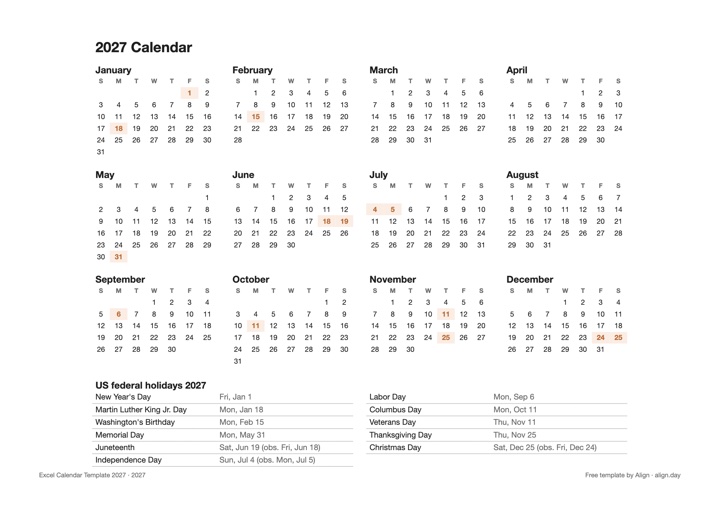
XLSX 13 sheets · Excel, Numbers, Google Sheets
Download 2027 Excel Calendar →What's included
- A 2027 sheet: the year in three rows of four months, holidays highlighted, and the list of federal holidays below
- Twelve month sheets, January to December 2027, weeks starting on Sunday
- A large cell under every date for typing plans, and a Notes column beside each week
- US federal holidays filled in on their dates, with the observed weekday when one falls on a weekend
- A Focus this month field on every month sheet, and frozen weekday headers
- Print-ready: one landscape page per sheet on Letter or A4, plus a printable PDF of all 13 sheets
US federal holidays in 2027
- New Year's Day: Friday, January 1
- Martin Luther King Jr. Day: Monday, January 18
- Washington's Birthday: Monday, February 15
- Memorial Day: Monday, May 31
- Juneteenth: Saturday, June 19 (observed Friday, June 18)
- Independence Day: Sunday, July 4 (observed Monday, July 5)
- Labor Day: Monday, September 6
- Columbus Day: Monday, October 11
- Veterans Day: Thursday, November 11
- Thanksgiving Day: Thursday, November 25
- Christmas Day: Saturday, December 25 (observed Friday, December 24)
How to plan 2027 in an Excel calendar
- Save a copy named for the year, and keep the download as a blank spare.
- Color the year first. On the 2027 sheet, give trips, school breaks and launches a fill color.
- Fill in each month before it starts. Type appointments and deadlines into the cell under their date.
- Set a focus. One line next to Focus this month, and one line per week in the Notes column.
- Print the month if you want it on the fridge or the desk: each sheet fits one landscape page.
Example: March 2027 in the Excel calendar
| Where on the sheet | What you type |
|---|---|
| 2027 sheet, March 22–26 | Fill color: spring break trip |
| March sheet, Focus this month | Finish the bathroom remodel |
| Cell under Mon, Mar 1 | Tile order arrives |
| Cell under Fri, Mar 12 | Quarterly taxes prep · 2 PM accountant |
| Cell under Mon, Mar 22 | Flight 7:40 AM |
| Notes, week of Mar 14 | Pick paint colors · book the plumber |
The year sheet shows March is short a week because of the trip, so the remodel's deadlines all land before March 19. For a printed year with mini months beside each month, use the 2027 calendar PDF.
If the dates also live in your iPhone calendar, Align shows those events next to your time blocks on one timeline.
Frequently asked questions
Is the Excel calendar template free?
Yes. The 2027 Excel calendar template is completely free. There is no signup and no email required. Download the .xlsx and open it in Excel or Numbers.
What's in the 2027 Excel calendar?
Thirteen sheets. The 2027 sheet shows the whole year in three rows of four months with the federal holidays highlighted and listed below. Then one sheet per month, January to December, with weeks starting on Sunday, a large cell under each date, a Notes column for every week and a Focus this month field.
Which holidays are filled in?
The eleven US federal holidays of 2027, each in its date cell. When a holiday falls on a weekend, the weekday it is observed is marked too: Juneteenth on Friday, June 18, Independence Day on Monday, July 5, and Christmas Day on Friday, December 24. The December sheet also marks Friday, December 31, when New Year's Day 2028 is observed.
How is it different from the printable 2027 calendar?
The 2027 calendar PDF is made for printing and writing by hand: two rows of six months on the year page and mini calendars beside each month. This Excel calendar is made for typing: a writing cell under every date, a notes column beside every week, four months to a row on the year sheet, and frozen weekday headers. It prints too, one page per sheet.
Can I use it as an Excel planner template?
Yes. Use the Focus this month field for the month's goal, the notes column for each week's priorities and the day cells for deadlines and plans. For hours in a day, pair it with the Excel schedule template.

