
Free Excel Schedule Template (Weekly and Daily .xlsx)
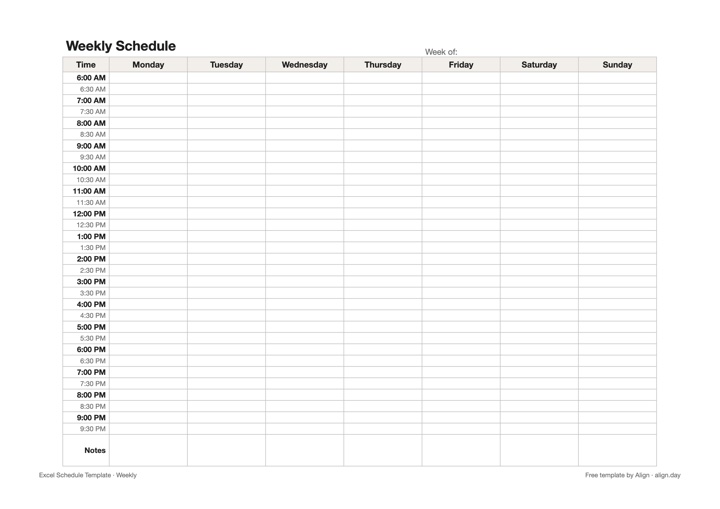
An editable Excel schedule template: a weekly sheet with Monday to Sunday in half-hour rows from 6 AM to 10 PM, and a daily sheet with the same rows, a Done column, Top 3 priorities and a to-do list. Free download, no signup.
XLSX 2 sheets · Excel, Numbers, Google Sheets
Download Excel Schedule Template →What's included
- Weekly sheet: Monday to Sunday columns, half-hour rows from 6 AM to 10 PM with the times filled in, a Week of field and a notes row for each day
- Daily sheet: the same half-hour rows with a Done column, and Top 3 priorities, a to-do list and notes beside them
- Frozen headers: the day names and times stay in view while you scroll
- Print-ready: a print area on each sheet, scaled to one page, landscape for the week and portrait for the day
- One editable .xlsx for Excel, Numbers and Google Sheets, plus a printable PDF of both sheets
How to make a weekly schedule in Excel
- Open the workbook and save a copy for the week, so the template stays blank.
- Type the fixed times first on the Weekly sheet: classes, shifts, meetings, the school run.
- Shade each block with a fill color: select its cells, then use Fill Color on the Home tab in Excel, or the Format sidebar in Numbers. One color per kind of work.
- Merge nothing. Leave the half-hour cells separate so you can move a block later by cutting and pasting its cells.
- Plan the day on the Daily sheet each morning: copy the day's blocks across, pick your Top 3 and tick Done as you finish.
Example: a week on the Excel weekly schedule
Week of: Mon, Jan 4, 2027 · a full-time job, an evening course and a long run on Saturday
| Time | Monday | Tuesday | Wednesday | Thursday | Friday | Saturday | Sunday |
|---|---|---|---|---|---|---|---|
| 6:30 AM | Run | Run | Run | ||||
| 8:00 AM | Commute | Commute | Commute | Commute | Commute | Long run | |
| 9:00 AM | Team stand-up | Budget review | Team stand-up | Client calls | Team stand-up | Long run | Family breakfast |
| 10:00 AM | Proposal draft | Proposal draft | Proposal edits | Client calls | Weekly report | Groceries | |
| 6:30 PM | Dinner | Spanish class | Dinner | Spanish class | Dinner out | Meal prep | |
| 8:00 PM | Read | Spanish class | Read | Spanish homework | Plan the week |
Notes: Tue: bring the laptop charger to class · Sun: book the dentist
On the Daily sheet for Wednesday, the Top 3 are send the proposal, Spanish homework and call Mom, and the proposal edits fill 10:00 to 11:30 AM with a tick in Done at 11:30.
The example shows six of the 32 half-hour rows. The proposal gets the same morning slot three days running, the course evenings are blocked before anything else lands on them, and Sunday evening is kept for planning the next week. For a printable week split into 15-minute rows, use the 7-day weekly time blocking template.
If you'd rather move blocks with a finger than cut and paste cells, Align puts your time blocks on a visual timeline on your iPhone.
Frequently asked questions
Is the Excel schedule template free?
Yes. The Excel schedule template is completely free. There is no signup and no email required. Download the .xlsx and open it in Excel or Numbers.
What's in the workbook?
Two sheets. Weekly is an Excel weekly schedule template: Monday to Sunday in half-hour rows from 6 AM to 10 PM, a Week of field and a notes row. Daily is an Excel daily schedule template: the same half-hour rows with a Done column, plus Top 3 priorities, a to-do list and notes beside them.
How is it different from the Excel time blocking template?
The Excel time blocking template has daily, weekly and monthly tabs, and its week runs Monday to Friday. This schedule template runs all seven days in half-hour rows with the times already filled in, freezes the header row and time column while you scroll, and prints each sheet on one page. For daily, weekly and monthly tabs, use the Excel time blocking template.
Does it work in Numbers and on a Mac?
Yes. Excel for Mac and Windows, Excel for iPad and Apple Numbers all open the .xlsx. In Numbers, each sheet becomes its own tab. The file also opens in Google Sheets; the Google Sheets schedule template shows how.
Will it print on one page?
Yes. Each sheet has its print area set and is scaled to fit one page: the weekly sheet in landscape, the daily sheet in portrait. It prints on US Letter or A4. A printable PDF of both sheets is on this page too.

