
Free Google Sheets Calendar Template 2027 (with Holidays)
A 2027 calendar for Google Sheets: a year tab with all twelve months and the US federal holidays, then a tab for every month with a cell under each date to type in. Share it with your family or team and edit it from any browser or phone. Free, no signup.
XLSX 13 tabs · open it in Google Sheets in three steps
Download for Google Sheets (.xlsx) →Open it in Google Sheets in three steps
- Upload the .xlsx to Google Drive: New, then File upload.
- Open it: right-click the file, then Open with, then Google Sheets.
- Save it as a Google Sheet: File, then Save as Google Sheets.
What's included
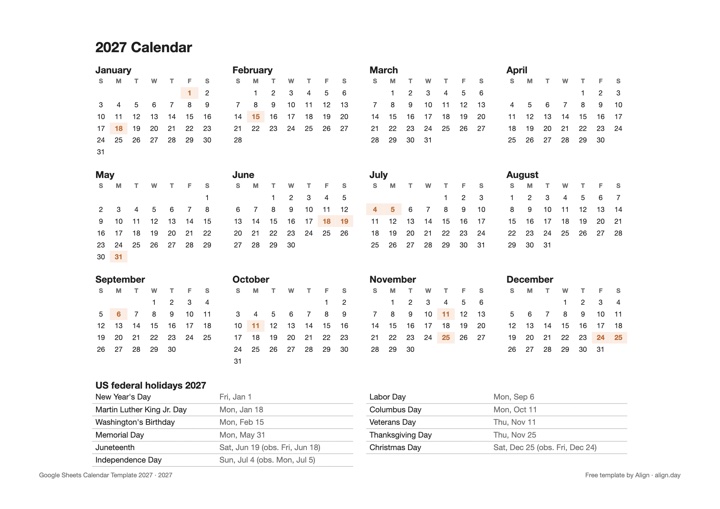
- A 2027 tab with the year in three rows of four months, holidays highlighted, and the federal holiday list below
- Twelve month tabs, weeks starting on Sunday, with a cell under every date and a Notes column for each week
- The US federal holidays on their dates, with the observed weekday when one falls on a weekend
- A Focus this month field and frozen weekday headers that stay put on a phone screen
- A printable PDF of all 13 tabs, one landscape page each
How to share and print the calendar from Google Sheets
- Share once, plan together. Click Share and add your household or team. Editors type into the date cells; Commenters can leave a note on a cell without changing it.
- Use the phone app for quick additions: in the Google Sheets app, tap a cell under a date, type, and it syncs.
- Color by person. Give each person a fill color, so a shared month shows who has what at a glance.
- Print a month. Open its tab, choose File, then Print, pick Current sheet, set the orientation to Landscape and the scale to Fit to page.
Example: a shared family calendar for July 2027
| Where on the tab | What the family types |
|---|---|
| July tab, Focus this month | Camp, the beach week and Grandma's visit |
| Cell under Mon, Jul 5 | Independence Day (observed) is filled in · BBQ at the park |
| Cells under Jul 12–16, blue | Maya: soccer camp, 9 AM–3 PM |
| Cells under Jul 19–23, green | Beach week, the whole family |
| Cell under Sat, Jul 31 | Grandma arrives, airport 4:15 PM |
| Notes, week of Jul 25 | Who drives on Saturday? (a comment for Dad) |
Everyone sees the same July on their phone, and the beach week is blocked before anyone books over it. For a calendar you print and write on by hand, use the 2027 calendar PDF.
For the hours inside each day, Align shows your calendar events next to your time blocks on one visual timeline on your iPhone.
Frequently asked questions
Is the Google Sheets calendar template free?
Yes. The 2027 Google Sheets calendar template is completely free. There is no signup and no email required. Download the file and open it in Google Sheets with your own Google account.
How do I open the calendar in Google Sheets?
Upload the .xlsx to Google Drive, open it with Google Sheets, then choose File, Save as Google Sheets. The copy that opens is a regular Google Sheet in your Drive, with all thirteen tabs, the colors and the holidays.
Is there a Google Docs calendar template?
Not a separate one: a calendar grid edits best in Sheets. To put a month into a Google Doc, select the month's cells in Sheets, copy them and paste them into the Doc. Docs pastes them as a table you can edit.
Does it work with Google Calendar?
No. This is a spreadsheet calendar, not a Google Calendar import, so events you type in it stay in the sheet. Use it for a shared overview of the year, such as a family or team calendar, next to your Google Calendar.
How is it different from the printable 2027 calendar?
The 2027 calendar PDF is for printing and writing by hand. This calendar is a spreadsheet: a typing cell under every date, a notes column beside each week and frozen weekday headers, so several people can fill it in from a browser or phone. It is the same workbook as the Excel calendar template, with steps for Google Sheets.

