
Free Google Sheets Schedule Template (Weekly and Daily)
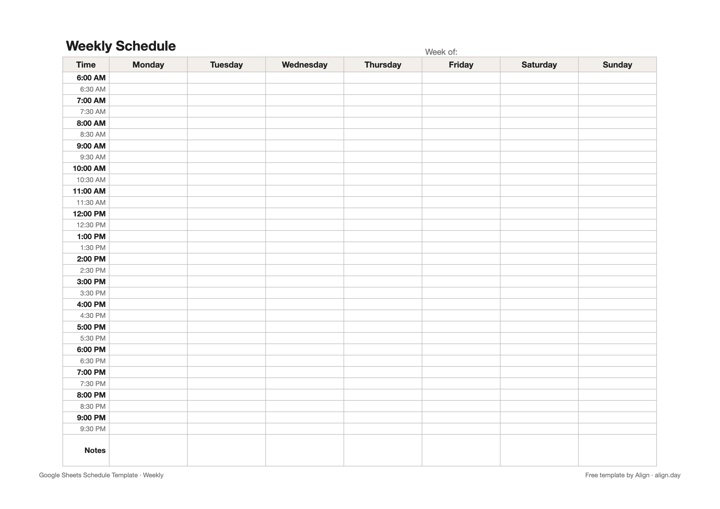
A schedule template for Google Sheets: a weekly tab with Monday to Sunday in half-hour rows from 6 AM to 10 PM, and a daily tab with the same rows, a Done column, Top 3 priorities and a to-do list. Share it and edit it from any browser or phone. Free, no signup.
XLSX 2 tabs · open it in Google Sheets in three steps
Download for Google Sheets (.xlsx) →Open it in Google Sheets in three steps
- Upload the .xlsx to Google Drive: New, then File upload.
- Open it: right-click the file, then Open with, then Google Sheets.
- Save it as a Google Sheet: File, then Save as Google Sheets.
What's included
- A Weekly tab: Monday to Sunday in half-hour rows from 6 AM to 10 PM, a Week of field and a notes row for each day
- A Daily tab: the same rows with a Done column, plus Top 3 priorities, a to-do list and notes
- Frozen day names and times, so the grid stays readable on a phone
- A printable PDF of both tabs: the week in landscape, the day in portrait
How to plan, share and print a schedule in Google Sheets
- Duplicate before you fill in. Right-click the Weekly tab, choose Duplicate and rename the copy for the week. The original stays blank.
- Share the week with whoever shares the plan: a partner, a roommate, a small team. Give Editor access to people who add to it and Viewer to the rest.
- Leave comments instead of edits. Select a cell and press Ctrl+Alt+M (Cmd+Option+M on a Mac) to ask about a block without changing it.
- Check it on your phone. In the Google Sheets app, the frozen header and time column keep you oriented while you scroll.
- Print the week. Choose File, then Print, pick Current sheet, set Landscape and Fit to page. For the Daily tab, use Portrait.
Example: a shared week for two roommates
Week of: Mon, Jan 4, 2027 · shared with Jordan, who has Editor access
| Time | Monday | Tuesday | Wednesday | Thursday | Friday | Saturday | Sunday |
|---|---|---|---|---|---|---|---|
| 7:00 AM | Sam: gym | Jordan: early shift | Sam: gym | Jordan: early shift | Sam: gym | ||
| 9:00 AM | Sam: work from home | Sam: office | Sam: work from home | Sam: office | Sam: work from home | Cleaning, both | |
| 12:30 PM | Washer: Sam | Washer: Jordan | Brunch, both | ||||
| 6:00 PM | Jordan: class | Dinner: Sam cooks | Jordan: class | Dinner: Jordan cooks | Movie night | Groceries, both | |
| 8:30 PM | Plan next week |
Notes: Wed: plumber between 1 and 3 PM, who's home? (a comment for Jordan)
On the Daily tab for Wednesday, Sam's Top 3 are finish the slide deck, be home for the plumber and pay rent, with Done ticked at 3 PM.
The example shows five of the 32 half-hour rows. Both roommates see who has the washer and who cooks, and the plumber question gets answered in a comment instead of a group chat. For a time blocking sheet you copy straight into Drive, use the Google Sheets time blocking template.
To get a reminder when a block starts, Align keeps your time blocks on a visual timeline on your iPhone, and you can set an alarm on any block to be notified when it begins.
Frequently asked questions
Is the Google Sheets schedule template free?
Yes. The Google Sheets schedule template is completely free. There is no signup and no email required. Download the file and open it in Google Sheets with your own Google account.
How do I open the schedule in Google Sheets?
Upload the .xlsx to Google Drive, open it with Google Sheets, then choose File, Save as Google Sheets. The copy that opens is a regular Google Sheet in your Drive, with the Weekly and Daily tabs.
How is it different from the Google Sheets time blocking template?
The Google Sheets time blocking template is a Sheet you copy straight into Drive, made for time blocking. This schedule runs Monday to Sunday in half-hour rows from 6 AM to 10 PM with the times filled in, adds a daily tab with a Done column, Top 3 priorities and a to-do list, and keeps the day names and times frozen while you scroll.
Can I use it as a Google Sheets weekly planner on my phone?
Yes. Open it in the Google Sheets app on iPhone or Android. The day names and the time column stay frozen, so you can scroll the week with a thumb and still see which half hour you're in.
Is there a Google Docs schedule template?
Not a separate one: a half-hour grid edits best in Sheets. To put the week into a Google Doc, select the cells in Sheets, copy them and paste them into the Doc as a table.

