
Free Hourly Planner (Printable PDF)
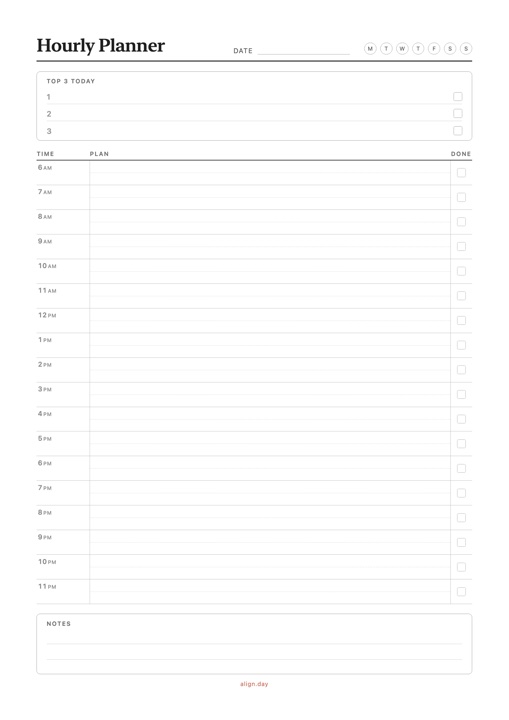
A simple daily hourly planner with one row per hour from 6 AM to 11 PM. Free download, no signup.
PDF 1 page · A4, prints on Letter
Download Hourly Planner PDF →What's included
- One row per hour from 6 AM to 11 PM, with a light half-hour guide
- A write-in time column with room for your own times, so you can shift the day
- A Top 3 box for the day's priorities and a Done box on every hour
- A small notes area for things to carry over
- One A4 page that prints on US Letter, in light, ink-friendly gray
How to use an hourly planner
An hourly planner works like a printable hourly schedule template: you decide what each hour of the day is for before the day starts.
- Write your Top 3. Pick the three things that would make today a success.
- Fill in fixed commitments. Meetings, classes, meals and travel go into their hours first.
- Give each Top 3 item an hour. Put it where your energy is highest, usually the morning.
- Leave some hours open. A day planned to the minute breaks at the first interruption.
- Tick the Done box as you go, and use the notes to carry anything that slipped to tomorrow.
Example: a full day on the hourly planner
Top 3: finish the quarterly report draft · call the dentist · 30-minute run
| Time | Plan |
|---|---|
| 6 AM | Wake up, coffee, no phone |
| 7 AM | 30-minute run, shower |
| 8 AM | Breakfast, commute |
| 9 AM | Quarterly report: outline and numbers |
| 10 AM | Quarterly report: write the draft |
| 11 AM | Team meeting |
| 12 PM | Lunch away from the desk |
| 1 PM | Email and messages, call the dentist |
| 2 PM | Quarterly report: finish and send the draft |
| 3 PM | Open hour for whatever ran over |
| 4 PM | Admin, plan tomorrow |
| 5 PM | Commute, groceries |
| 6 PM | Cook and eat dinner |
| 7 PM | Family time |
| 8 PM | Reading |
| 9 PM | Tidy up, prepare for tomorrow |
| 10 PM | Wind down |
| 11 PM | Sleep |
The 3 PM hour is left open on purpose. If the meeting runs long or the draft takes more time, it absorbs the overflow without pushing the rest of the evening.
Plans move when the day changes, and Align lets you drag a block on your iPhone instead of rewriting the page.

