
Free Run of Show Template (Printable PDF)
A run of show template for events of any size: 20 numbered rows with start, length, item, owner, location and tech notes on one landscape page, and a running-time check that tells you before the day whether the show ends on time. Free download, no signup.
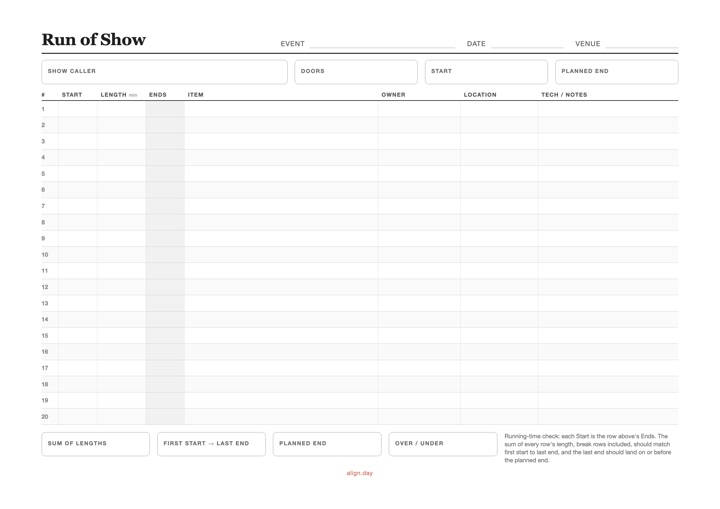
PDF 1 page · A4 landscape, prints on Letter
Download Run of Show Template PDF →What's included
- Event, Date and Venue fields, and boxes for the Show caller, Doors, Start and Planned end
- 20 numbered rows with Start, Length (minutes), Ends, Item, Owner, Location and Tech / notes
- A shaded Ends column that becomes the next row's Start
- A running-time check: sum of lengths, first start to last end, planned end, and over or under
- One A4 landscape page that prints on US Letter, in light, ink-friendly gray
Why an event schedule needs a running-time check
An event slips a few minutes at a time: a speaker runs long, a changeover takes five minutes instead of two. On paper, the same thing happens when lengths are added up wrong. Chaining every Start to the row above's Ends, and checking the last end against the planned end, catches the error while there is still time to cut an item. It's time blocking for a whole team: every item gets its own block, and the blocks have to fit the evening.
The Owner, Location and Tech columns are what set this sheet apart from the time boxing template, which gives one person's tasks a box of minutes and a Done column.
How to write a run of show
- Fill in the header: event, date, venue, show caller, and the doors, start and planned end times.
- List every item in order, from doors to close. Include changeovers, walk-ins and breaks: they take time too.
- Give each item a length, an owner and a location, and note the mics, slides, music or lighting it needs.
- Chain the times. Write the first Start, add the Length to get Ends, and carry Ends down as the next row's Start.
- Run the check. Add up the lengths and compare the last Ends with the planned end. If you're over, cut or shorten something now.
- Share it with everyone named in the Owner column, and give the show caller a copy for the day.
Example: a product launch evening
Event: Spring launch · Date: Thu, April 8 · Venue: The Foundry Show caller: Leo · Doors: 6:00 PM · Start: 6:30 PM · Planned end: 8:00 PM
| # | Start | Length | Ends | Item | Owner | Location | Tech / notes |
|---|---|---|---|---|---|---|---|
| 1 | 6:30 | 5 | 6:35 | Welcome | Dana (host) | Main stage | Handheld mic, walk-in music out |
| 2 | 6:35 | 15 | 6:50 | Keynote: why we built it | Priya (CEO) | Main stage | Lapel mic, slides 1–24 |
| 3 | 6:50 | 10 | 7:00 | Live demo | Marco | Main stage | Laptop on HDMI 2, backup video ready |
| 4 | 7:00 | 15 | 7:15 | Customer panel | Dana + 3 guests | Main stage | 4 handhelds, chairs set in item 3 |
| 5 | 7:15 | 10 | 7:25 | Q&A | Dana | Main stage | Runner with a mic in the room |
| 6 | 7:25 | 5 | 7:30 | Thank you, doors to the bar | Priya | Main stage | Music up, house lights up |
| 7 | 7:30 | 30 | 8:00 | Drinks and demos | Team | Bar, demo tables | Demo units charged |
Check: sum of lengths 90 min · first start to last end 6:30–8:00 · planned end 8:00 PM · over / under: 0 min.
The schedule ends on time with nothing to spare, so if the panel runs long, the Q&A shortens to five minutes. Deciding that in advance is the point of the check.
If you plan your own day on your iPhone, your slots in the show can become time blocks in Align, with a reminder before each one.
More printable templates
- Time Boxing Template
- Wedding Day Timeline Template
- Travel Itinerary Template
- Employee Schedule Template
- All templates →
Frequently asked questions
Is the run of show template free?
Yes. The run of show template PDF is completely free. There is no signup and no email required. Click the download link and print it.
What is a run of show?
A run of show is the minute-by-minute running order of an event: every item in order, when it starts, how long it takes, who owns it, where it happens and what the tech team needs. Everyone working the event reads from the same sheet.
Can I use it as an event schedule or conference schedule template?
Yes. For a conference, use one sheet per room or per day, with each talk as a row and the speaker as the owner. For a party, gala or launch, use one sheet for the whole event, from doors to close.
How does the running-time check work?
Each row has an Ends time, Start plus Length, which is the next row's Start. At the bottom, add up every row's length, break rows included, write the first start to the last end, and compare the last end with the planned end. If the show runs over, cut or shorten an item before the day, not during it.
How is it different from the time boxing template?
The time boxing template is one person's day: tasks with a box of minutes, a start, an end and a Done column for the actual minutes. The run of show is a landscape sheet for a team: every item has an owner, a location and tech notes, and the times chain into a running-time check against a planned end. For your own tasks, use the time boxing template.
Can I print it on US Letter paper?
Yes. The page is A4 landscape with wide margins, so it prints on US Letter too. Choose "Fit to page" in the print dialog if your printer adds its own margins.

