
Free Time Management Worksheet: Time Audit Template (Printable PDF)
A two-page time audit: log one day in 30-minute rows, mark each half hour with a category and whether you planned it, then add the week up and decide what to change. Free download, no signup.
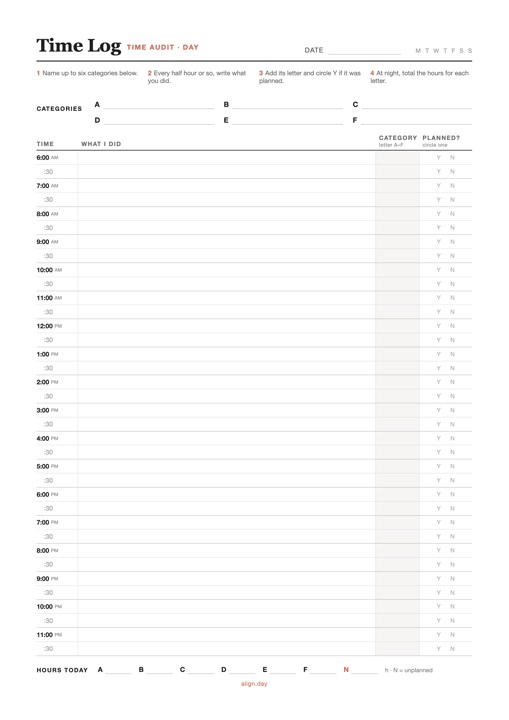
PDF 2 pages · A4, prints on Letter
Download Time Audit PDF →What's included
- Page 1, Time Log: one row per half hour from 6 AM to midnight, with What I did, a Category letter and Planned? (Y or N to circle)
- A category key to name up to six categories, A to F, and an Hours today line to total each one and the unplanned rows
- Page 2, Weekly Summary: hours per category for Monday to Sunday, a Total and a Next week column
- A What the log shows box and a Change next week box split into Keep, Cut and Block
- Two A4 pages that print on US Letter, in light, ink-friendly gray. Print the Time Log once per day you track.
Why a time audit works
Most people guess wrong about where their hours go. Meetings feel like most of the day, and email feels like a few minutes here and there, until someone writes it down. A time audit replaces the guess with a record: a week of half hours, each with a category, added up. The Planned? column shows the second thing a plain time log misses: how much of the day went to things you never decided to do.
The point isn't the log itself. It is what you change next week, which is why the second page ends in a Block list: the things that get a fixed day and time on your calendar.
How to do a time audit
- Name your categories in the key: up to six, such as deep work, meetings, email, admin, breaks and personal. Fewer is easier.
- Log as you go. Every hour or two, fill the rows since the last entry. Write what you actually did, not what was on the calendar.
- Add the letter and circle Y or N. Y if you planned it before the day started, N if it came up.
- Total the day on the Hours today line. Each row is half an hour, so two rows make an hour.
- Add up the week on the Weekly Summary, then set the hours you want each category to get next week.
- Fill Keep, Cut and Block, and give every Block item a day and a time on a weekly planner or your calendar.
Example: a workday and the week's summary
Categories: A Deep work · B Meetings · C Email and chat · D Admin · E Breaks and meals · F Commute
Time Log, Mon 7 Dec (8 AM to 6 PM shown)
| Time | What I did | Category | Planned? |
|---|---|---|---|
| 8:00 AM | Commute | F | Y |
| :30 | Commute | F | Y |
| 9:00 AM | Email inbox | C | N |
| :30 | Chat catch-up | C | N |
| 10:00 AM | Team standup | B | Y |
| :30 | Quarterly report | A | Y |
| 11:00 AM | Client call that ran over | B | N |
| :30 | Quarterly report | A | Y |
| 12:00 PM | Lunch | E | Y |
| :30 | Lunch, scrolled the news | E | N |
| 1:00 PM | C | N | |
| :30 | Project meeting | B | Y |
| 2:00 PM | Project meeting | B | Y |
| :30 | Expense report | D | Y |
| 3:00 PM | A quick question from Sam turned into a review | B | N |
| :30 | Quarterly report | A | Y |
| 4:00 PM | Email and chat | C | N |
| :30 | Book travel for the conference | D | Y |
| 5:00 PM | C | N | |
| :30 | Commute | F | Y |
Hours today: A 1.5 · B 2.5 · C 2.5 · D 1 · E 1 · F 1.5 · N 4
Weekly Summary, week of 7 Dec (hours)
| Category | Mon | Tue | Wed | Thu | Fri | Total | Next week |
|---|---|---|---|---|---|---|---|
| A Deep work | 1.5 | 2 | 1 | 2.5 | 1 | 8 | 12 |
| B Meetings | 2.5 | 3 | 4 | 2 | 1.5 | 13 | 10 |
| C Email and chat | 2.5 | 2 | 2.5 | 2 | 3 | 12 | 7 |
| D Admin | 1 | 1 | 0.5 | 1 | 1.5 | 5 | 5 |
| E Breaks and meals | 1 | 1 | 1 | 1 | 1.5 | 5.5 | 5.5 |
| F Commute | 1.5 | 1 | 1 | 1.5 | 1.5 | 6.5 | 6.5 |
| Total logged | 10 | 10 | 10 | 10 | 10 | 50 | 46 |
| N, of which unplanned | 4 | 3 | 3.5 | 2.5 | 4 | 17 | 10 |
What the log shows: Email and chat took 12 hours, more than deep work. 17 of 50 hours were unplanned, mostly inbox checks between meetings and calls that ran over.
Change next week
- Keep: the 10:00 standup · lunch away from the desk
- Cut: checking email every hour · the Wednesday status meeting, replaced by a written update
- Block: quarterly report, Tue to Fri 9:00–11:00 · email at 11:30, 1:30 and 4:30 · 15 minutes free after every client call
The log didn't need to be perfect to be useful. Four hours of N on Monday was enough to see that the morning inbox check was eating the best hours, so the Block list moves deep work into them and gives email three fixed slots.
Once you know which blocks you want next week, Align lays them out on a visual timeline next to your calendar events, and a recurring block keeps them there every week.
More printable templates
- Daily Schedule Template (Plan and Actual)
- Time Boxing Template
- Weekly Planner Template
- Eisenhower Matrix Template
- All templates →
Frequently asked questions
Is the time management worksheet free?
Yes. The PDF is completely free. There is no signup and no email required. Download it and print one Time Log page for each day you track and one Weekly Summary page.
What is on the two pages?
Page 1 is the Time Log: a Date field, a key to name up to six categories, A to F, and one row per half hour from 6 AM to midnight, with columns for What I did, the category letter and Planned?, Y or N to circle. An Hours today line at the bottom totals each category and the unplanned rows. Page 2 is the Weekly Summary: a table with your categories down the side and Monday to Sunday across, a Total and a Next week column, then a What the log shows box and a Change next week box split into Keep, Cut and Block.
How is it different from the daily schedule template?
The daily schedule template is for planning: each half hour has a Plan column and an Actual column, to compare the day you planned with the day you had. The time audit worksheet only records what happened, and adds what a plan sheet doesn't have: a category letter on every row, a planned or unplanned mark, daily totals per category, and a second page that adds the week up and turns it into changes. If you want to plan and check one day, use the daily schedule template. If you want to know where a whole week goes, use this one.
Can I use it as a time log, time study or time tracking template?
Yes. Page 1 works as a time log template or time tracker sheet for any day, and the two pages together are a simple time study: a week of logged half hours, totaled by category. It is paper only, so you write the entries yourself.
How long should I keep the time log?
One full week gives the clearest picture, because workdays and weekends are rarely the same. If a week is too much, log three workdays and one day off. Fill the log every hour or two: from memory at the end of the day, most of the small interruptions disappear.
Can I print it on US Letter paper?
Yes. Both pages are A4 portrait with wide margins, so they print on US Letter too. Choose "Fit to page" in the print dialog if your printer adds its own margins.
Can I use it on my iPad?
Yes. Open the PDF in GoodNotes, Notability, or any PDF annotation app, duplicate the Time Log page for each day, and write on it with your Apple Pencil or finger.

