
Free Time Boxing Template (Printable PDF)
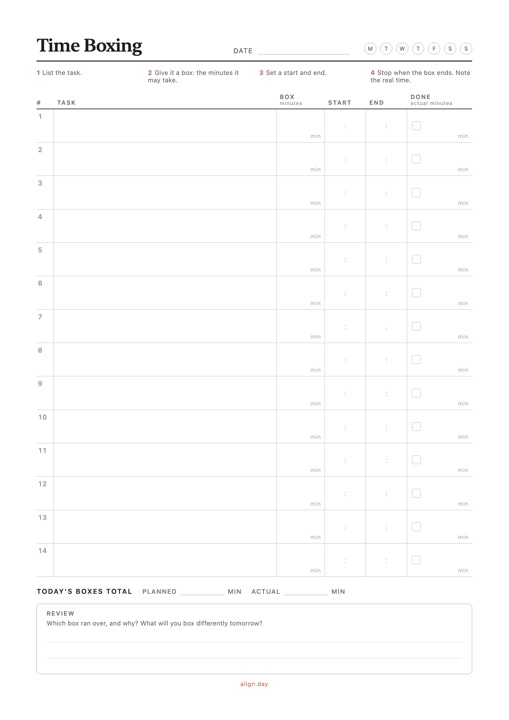
A one-page time boxing worksheet: give each task a box of minutes, a start and an end, then tick it off and note how long it really took. Free download, no signup.
PDF 1 page · A4, prints on Letter
Download Time Boxing Template PDF →What's included
- 14 rows, each with Task, Box (minutes), Start, End and Done with the actual minutes
- A Today's boxes total line for planned and actual minutes
- A short review prompt: which box ran over, and what to box differently tomorrow
- A four-step reminder of the method at the top of the sheet
- One A4 page that prints on US Letter, in light, ink-friendly gray
Time boxing vs. time blocking
Time boxing fixes how long a task may take: you give it 45 minutes and stop when they're up. Time blocking fixes when it happens, by putting it on the clock. Most people combine the two, which is why this worksheet has a Box column and Start and End columns side by side.
How to use a time boxing template
- List the tasks you want to finish today, one per row, most important first.
- Give each task a box. Write the minutes it may take, not the minutes you hope it takes. Add them up: if the boxes don't fit in your free hours, cut a task now rather than at 5 PM.
- Set a start and an end for every box, with short gaps between them.
- Stop when the box ends. Either the task is done, or you decide on purpose to give it another box. Tick Done and write the actual minutes.
- Total and review. Compare planned and actual minutes and note what to box differently tomorrow.
Example: a workday in six boxes
| # | Task | Box | Start | End | Done / actual |
|---|---|---|---|---|---|
| 1 | Write the project proposal | 90 min | 9:00 | 10:30 | ✓ 105 min |
| 2 | Email and messages | 30 min | 10:45 | 11:15 | ✓ 25 min |
| 3 | Slides for Thursday's meeting | 60 min | 11:15 | 12:15 | ✓ 60 min |
| 4 | Review two contracts | 45 min | 1:30 | 2:15 | ✓ 50 min |
| 5 | Expense report | 25 min | 2:30 | 2:55 | ✓ 20 min |
| 6 | Plan tomorrow | 15 min | 4:45 | 5:00 | ✓ 15 min |
Today's boxes total: 265 minutes planned, 275 actual.
Review: the proposal ran 15 minutes over, so the next writing task gets a 105-minute box or is split into two boxes. Email fit in less than its box, and the gaps between boxes absorbed the overrun without moving the afternoon.
If you plan on your iPhone, a time block in Align has a start and an end, so each box can become a block on your day's timeline.

