
Free To-Do List Template (Printable PDF)
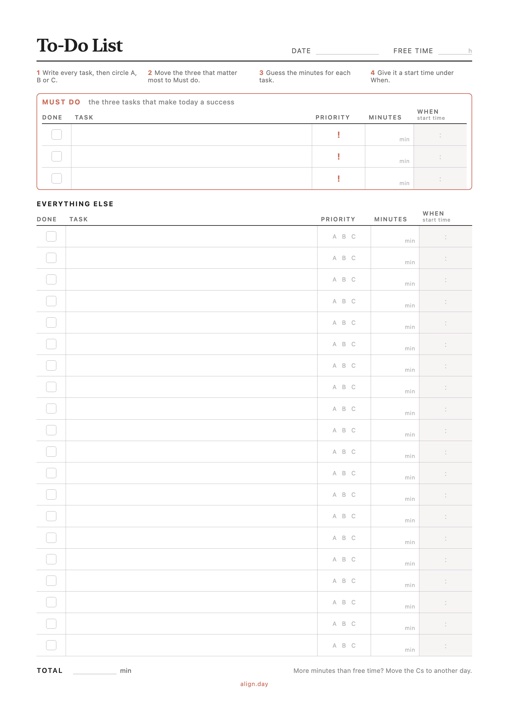
A printable to-do list where every task gets a priority, its minutes and a time to start, so the list turns into a plan for the day. Three Must do lines on top, 20 more below. Free download, no signup.
PDF 1 page · A4, prints on Letter
Download To-Do List PDF →What's included
- A Must do box with three lines for the tasks that make the day a success
- 20 task lines under Everything else
- On every line: a Done box, the task, a priority (a preprinted ! on the Must do lines, A, B or C to circle on the rest), its minutes and a When column for the start time
- A Date and a Free time field at the top, and a Total line for the minutes
- One A4 page that prints on US Letter, in light, ink-friendly gray
Why a to-do list needs a When column
A plain list grows faster than the day. It holds eight hours of tasks for three free hours, and the important ones sit next to the trivial ones. Two columns fix that. Minutes shows whether the list fits before you start: add them up and compare the total with your free time. When makes each task a decision instead of a hope, because a task with a start time is a time block, not a wish.
If you'd rather see the hours drawn out beside a shorter list, the daily planner template puts a 6 AM to 10 PM schedule and a 12-line to-do list on one page.
How to turn a to-do list into time blocks
- Write down every task under Everything else, and how many hours you have free today in the Free time field.
- Circle a priority for each: A must happen today, B should, C could.
- Move three tasks to Must do. Pick the ones that would make the day a success, even if nothing else gets done.
- Guess the minutes and add them up on the Total line. More minutes than free time? Move the Cs to another day.
- Give each task a When. Must dos go first, into the hours when you think best. Batch small tasks into one slot instead of scattering them.
- Copy the times onto a schedule. For a full picture of the day, write each task into its slot on the daily time blocking template, around your meetings and meals.
Example: a Thursday to-do list
Date: Thu 3 Dec · Free time: 5 h
Must do
| Done | Task | Priority | Minutes | When |
|---|---|---|---|---|
| ☐ | Finish the budget slides | ! | 90 | 9:00 |
| ☐ | Send the client the revised quote | ! | 30 | 10:45 |
| ☐ | Book the car service | ! | 10 | 1:00 |
Everything else
| Done | Task | Priority | Minutes | When |
|---|---|---|---|---|
| ☐ | Review Sam's draft | A | 45 | 2:00 |
| ☐ | Reply to emails | B | 30 | 11:15 |
| ☐ | Pay the electricity bill | B | 5 | 1:10 |
| ☐ | Order printer ink | B | 5 | 1:15 |
| ☐ | Plan next week's meetings | B | 20 | 3:00 |
| ☐ | Gym | B | 60 | 6:00 |
| ☐ | Clear out the downloads folder | C | 20 | — |
| ☐ | Read the industry newsletter | C | 15 | — |
Total: 330 minutes for 5 free hours (300 minutes), so the two C tasks get no When and move to Friday. The car service, the bill and the ink share one slot after lunch, so they don't interrupt the slides in the morning.
In Align, each task with a When time can be a time block on your day's timeline, with a reminder before it starts.
More printable templates
- Daily Planner Template
- Daily Time Blocking Template (24-hour, 15-minute rows)
- Time Boxing Template
- Checklist Template
- All templates →
Frequently asked questions
Is the to-do list template free?
Yes. The to-do list PDF is completely free. There is no signup and no email required. Download it and print as many pages as you need.
What is on the to-do list page?
One A4 page. At the top, a Date and a Free time field and a Must do box with three lines. Below it, 20 task lines. Every line has a Done box, the task, a priority to circle (A, B or C, or ! in Must do), a Minutes column and a When column for the start time. A Total line at the bottom adds up the minutes.
How is it different from the daily planner template?
The daily planner gives half the page to an hour-by-hour schedule and puts a 12-line to-do list beside it. The to-do list template is the whole page for tasks: 23 lines, each with a priority, its minutes and a When time, and no hour grid. Choose the daily planner if you want the hours drawn out, and this sheet if you start from a list and give each task a time.
Can I use it as a weekly to-do list?
Yes. Write the week's dates in the Date field and put a day and a time in the When column, such as Tue 9:00. The Must do box then holds the three tasks that matter most this week.
Can I print it on US Letter paper?
Yes. The page is A4 portrait with wide margins, so it prints on US Letter too. Choose "Fit to page" in the print dialog if your printer adds its own margins.
Can I use the to-do list on my iPad?
Yes. Open the PDF in GoodNotes, Notability, or any PDF annotation app and write on it with your Apple Pencil or finger.

