
Free Weekly Hourly Planner (Printable PDF)
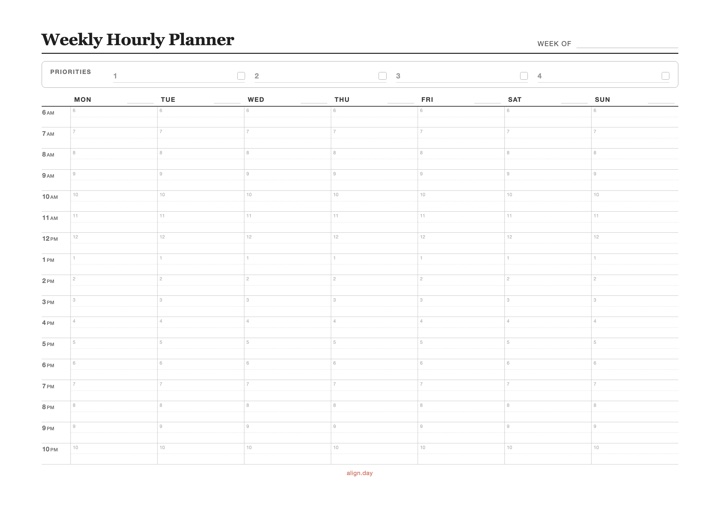
A Monday-to-Sunday hourly weekly calendar on one landscape page, with one row per hour from 6 AM to 10 PM and a priorities strip on top. Free download, no signup.
PDF 1 page · A4 landscape, prints on Letter
Download Weekly Hourly Planner PDF →What's included
- Seven full-width day columns, Monday to Sunday, each with a line for the date
- One row per hour from 6 AM to 10 PM, with a light half-hour guide
- The hour printed in every cell, so each column reads on its own
- A priorities strip across the top with four tick boxes
- Undated: start any week
- One A4 landscape page that prints on US Letter, in light, ink-friendly gray
How to use a weekly hourly planner
A weekly hourly schedule template shows the whole week with times, so you can see where every hour goes before the week starts.
- Write up to four priorities in the strip, and the dates next to each day.
- Block fixed commitments. Meetings, classes, shifts and appointments go into their hours first.
- Give each priority its hours. Mornings usually suit focused work, so start there.
- Leave an open hour each day. Something always runs over.
- Review on Sunday. Tick off the priorities you finished and carry the rest to next week.
Example: a workweek with evening study on the weekly hourly planner
Priorities: 1. Finish the Q2 budget · 2. Study for the Friday exam (6 hours) · 3. Two runs · 4. Plan Mia's birthday
| Hour | Mon | Tue | Wed | Thu | Fri | Sat | Sun |
|---|---|---|---|---|---|---|---|
| 7 AM | Run | Commute | Run | Commute | Commute | — | — |
| 9 AM | Budget: numbers | Team meeting | Budget: draft | Budget: send ✓ | Exam review | Farmers market | — |
| 1 PM | Lunch | Lunch | Lunch | Lunch | Exam, 1:30 | Mia's party prep | Family lunch |
| 3 PM | Client call | Open hour | Open hour | Done early | Mia's party | — | |
| 7 PM | Study, 1 h | Study, 1.5 h | Study, 1.5 h | Study, 2 h | Dinner out | — | — |
| 9 PM | Read | Read | Plan party | Read | — | — | Plan next week |
The example shows six of the 17 hours. The six study hours are spread across four evenings before the exam instead of one late night, and Wednesday and Thursday afternoons stay open for whatever the budget throws up.
For a single day, use the hourly planner. For a blank weekly calendar without printed hours, use the weekly schedule template, and for 15-minute rows the 7-day weekly time blocking template.
When a block moves, Align lets you drag it to a new hour on your iPhone, and it shows your existing calendar events on the same timeline.
Frequently asked questions
Is the weekly hourly planner free?
Yes. The weekly hourly planner PDF is completely free. There is no signup and no email required. Click the download link and print a sheet for every week.
What hours does the weekly hourly planner cover?
One row per hour from 6 AM to 10 PM, every day from Monday to Sunday, with a light dashed line at each half hour so you can start or end a block on the half.
How is it different from the 7-day weekly template and the 2027 weekly planner?
The 7-day weekly time blocking template is a portrait page with every hour split into 15-minute rows. The 2027 weekly planner is dated and keeps its priorities and notes in a side panel. This weekly hourly planner is undated and landscape: the priorities strip runs across the top so the seven day columns get the full page width, and every cell repeats its hour, so you can read a time anywhere on the grid without looking back at the time column.
Can I print the weekly hourly planner on US Letter paper?
Yes. The page is A4 landscape with at least 13 mm of white space on every side, so it prints on US Letter at Actual Size without clipping. If your printer still cuts an edge, choose "Fit to printable area" (or "Fit to page") in the print dialog.
Can I use the weekly hourly planner on my iPad?
Yes. Open the PDF in GoodNotes, Notability, or any PDF annotation app and write on it with your Apple Pencil or finger.

