
Free Weekly Schedule Template (Printable PDF)
A blank Monday-to-Sunday weekly calendar on one landscape page, with a write-in time column and 16 even rows you label yourself. Free download, no signup.
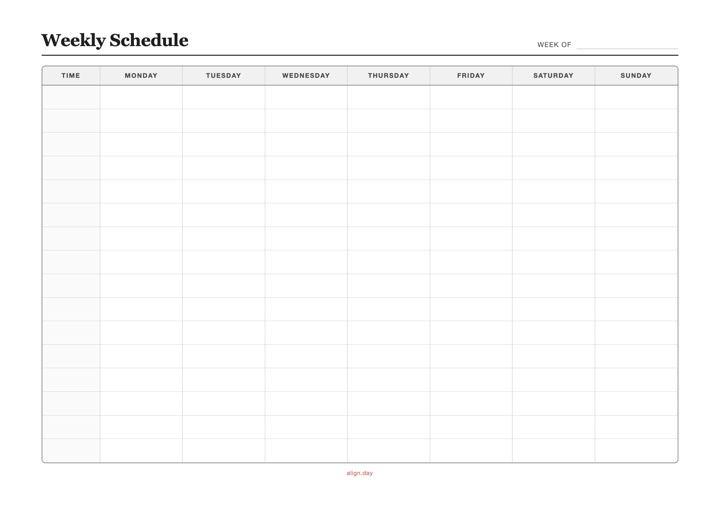
PDF 1 page · A4 landscape, prints on Letter
Download Weekly Schedule PDF →What's included
- Monday to Sunday in seven wide columns, so the weekend gets as much room as the workweek
- A blank write-in time column with no preset hours, for hours, class periods or shifts
- 16 even rows, big enough to write in by hand
- A Week of line for the week's dates
- One A4 landscape page that prints on US Letter, in light, ink-friendly gray
How to use a weekly schedule template
A weekly schedule template is a blank weekly calendar printable: the days are set, and you decide what each row means. That makes one sheet work for an office week, a school timetable, a shift rota or a family calendar.
- Write the week's dates on the Week of line.
- Label the Time column. Write hours (8 AM, 9 AM…), class periods (Period 1, Period 2…), or just Morning, Afternoon and Evening.
- Fill in what repeats every week first: work hours, classes, practice, pickups.
- Add this week's one-offs: appointments, deadlines, birthdays, errands.
- Pin it up. A printed weekly schedule on the fridge or by the desk keeps the whole household on the same plan.
Example: a family's week on the weekly schedule
Week of: March 1 – March 7
| Time | Monday | Tuesday | Wednesday | Thursday | Friday | Saturday | Sunday |
|---|---|---|---|---|---|---|---|
| 7 AM | School run (Sam) | School run (Alex) | School run (Sam) | School run (Alex) | School run (Sam) | Sleep in | Sleep in |
| 9 AM | Work | Work | Work from home | Work | Work | Soccer, 9:30 | Pancakes |
| 3 PM | Pickup (Alex) | Pickup (Sam) | Pickup (Alex) | Pickup (Sam) | Pickup (Alex) | Groceries | Visit Grandma |
| 4 PM | Swim lesson | Homework | Piano, 4:30 | Homework | Free | — | — |
| 6 PM | Dinner | Dinner | Dinner out | Dinner | Pizza night | BBQ at the Lees | Meal prep |
| 8 PM | Bills | Book club | — | Plan next week | Movie | — | Lunches packed |
The example uses six of the 16 rows. The family labels only the times that matter to them, and the rows left blank stay free for anything that comes up mid-week.
Want printed hours instead? The weekly hourly planner has one row per hour from 6 AM to 10 PM, and the 7-day weekly time blocking template splits each hour into 15-minute rows.
Scheduling a team instead of one person? The employee schedule template is a weekly roster with a row for each person, shift cells and total hours.
When the week's plans change, Align lets you set a block to repeat every week and then move just one day's block on your iPhone instead of rewriting the sheet.
Frequently asked questions
Is the weekly schedule template free?
Yes. The weekly schedule PDF is completely free. There is no signup and no email required. Click the download link and print as many weeks as you need.
Why doesn't the weekly schedule have times printed on it?
The time column is blank on purpose. Write in hours, class periods, work shifts, or simply morning, afternoon and evening. The 16 rows are even, so one row can be an hour, a 45-minute lesson or a whole block of the day.
How is it different from the weekly time blocking templates?
The 7-day and 5-day weekly time blocking templates are portrait grids with preset hours split into 15-minute rows. The weekly schedule is a landscape blank weekly calendar with no preset hours: 16 even rows you label yourself. If you want printed hours, use the weekly hourly planner.
Can I print the weekly schedule on US Letter paper?
Yes. The page is A4 landscape with at least 13 mm of white space on every side, so it prints on US Letter at Actual Size without clipping. If your printer still cuts an edge, choose "Fit to printable area" (or "Fit to page") in the print dialog.
Can I use the weekly schedule on my iPad?
Yes. Open the PDF in GoodNotes, Notability, or any PDF annotation app and write on it with your Apple Pencil or finger.

