
Free Weekly Work Schedule Template (Printable PDF)
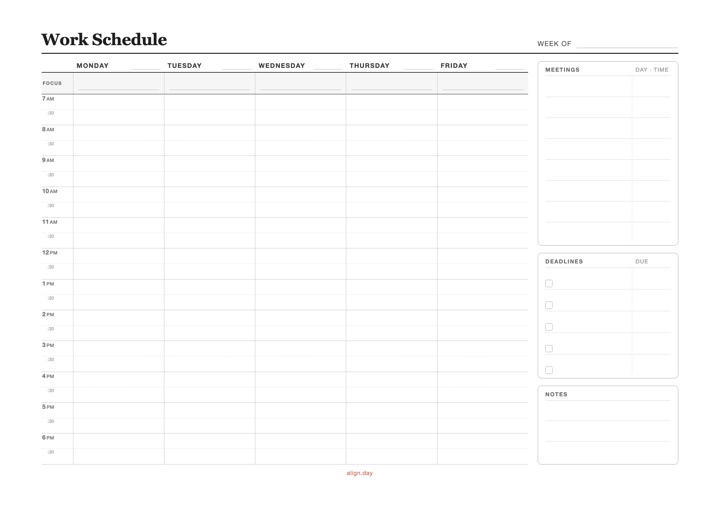
A work planner template for one person's week: Monday to Friday in half-hour rows from 7 AM to 7 PM, a focus line for each day and a panel for meetings and deadlines, on one landscape page. Free download, no signup.
PDF 1 page · A4 landscape, prints on Letter
Download Work Schedule PDF →What's included
- Monday to Friday columns, each with a line for the date
- A focus-of-the-day line at the top of every column
- Half-hour rows from 7 AM to 7 PM: a solid line on the hour, a dashed one on the half hour
- A meetings panel with a day-and-time cell on every line
- A deadlines panel with a due cell and a tick box on every line, plus a few lines for notes
- Undated: start any week
- One A4 landscape page that prints on US Letter, in light, ink-friendly gray
How to use a weekly work schedule
A work schedule template turns a list of meetings and deadlines into a week you can actually do. Fill it in on Friday afternoon or Monday morning.
- Copy in the fixed points. Meetings go into the meetings panel with their day and time, deadlines into the deadlines panel with their due day.
- Name each day's focus. One line, one thing: the report, the launch brief, the customer calls.
- Block the meetings first. Write each one into its half hours on the grid.
- Give the focus its longest open stretch. Two hours without a meeting does more than four half hours scattered across the day.
- Leave some half hours open, and set an end to the day, especially on the days you work from home.
- Tick deadlines as you meet them, and carry what slipped to next week's sheet.
Example: a hybrid week with a launch on the work schedule
Week of Mar 1 · Mon and Fri at home, Tue to Thu at the office
Focus: Mon: launch brief draft · Tue: customer interviews · Wed: launch brief final · Thu: Q3 report · Fri: admin and next week
| Time | Mon (home) | Tue | Wed | Thu | Fri (home) |
|---|---|---|---|---|---|
| 8:00 AM | Walk, then email | Commute | Commute | Commute | Walk, then email |
| 9:00 AM | Launch brief: outline | Standup | Standup | Standup | Inbox and expenses |
| 9:30 AM | Launch brief: draft | Interview 1 | Launch brief: edit | Q3 report: numbers | Inbox and expenses |
| 11:00 AM | Launch brief: draft | Interview 2 | Launch brief: edit | 1:1 with Sam | Open |
| 12:30 PM | Lunch away from the desk | Lunch | Lunch | Lunch | Lunch |
| 2:00 PM | Team sync | Interview notes | Launch review | Q3 report: write | Plan next week |
| 4:00 PM | Open | Interview 3 | Fixes from review | Q3 report: send ✓ | Done at 4:30 |
| 5:30 PM | Laptop closed | Commute | Commute | Commute | — |
Meetings: Mon 2:00 team sync · Tue 9:30, 11:00 and 4:00 customer interviews · Wed 2:00 launch review · Thu 11:00 1:1 with Sam
Deadlines: Wed launch brief ✓ · Thu Q3 report draft ✓ · Fri expenses ✓
The example shows eight of the 24 half-hour rows. The launch brief gets Monday morning at home, where nothing interrupts the first draft, and Wednesday morning at the office to edit it before the afternoon review. Tuesday and Thursday hold the interviews and the 1:1, Friday at home clears the admin and plans next week, and Monday and Friday end at a set time because there is no commute to end them.
For 15-minute detail and a to-do list beside the work week, use the 5-day weekly time blocking template. To plan seven days hour by hour, including evenings and the weekend, use the weekly hourly planner, and to schedule a team, the employee schedule template.
If your work calendar lives on your iPhone, Align shows its events on the same timeline as your time blocks, so the focus work fits around the meetings.
Frequently asked questions
Is the weekly work schedule template free?
Yes. The work schedule PDF is completely free. There is no signup and no email required. Click the download link and print a sheet for every work week.
What does the work schedule template include?
Monday to Friday columns with a line for each date, a focus-of-the-day line at the top of every column, half-hour rows from 7 AM to 7 PM, and a panel on the right with lines for meetings (with a day and time cell), deadlines (with a due cell and a tick box) and notes.
How is it different from the 5-day weekly time blocking template?
The 5-day weekly time blocking template is a portrait page with a column for each weekday, hour blocks marked at :15, :30 and :45, and to-do and notes areas. This work schedule is a landscape page with a dedicated row for every half hour from 7 AM to 7 PM, a focus line that names the one thing each day is for, and structured meetings and deadlines panels with day, time and due cells, so the week's fixed points sit next to the grid. If you want 15-minute detail and a to-do list beside the week, use the 5-day weekly template.
Can I use it as a daily work schedule?
Yes. Each column is one day's work schedule in half-hour rows, with its own focus line, so you can plan a day at a time and still see the rest of the week. For a single day on one page, use the daily schedule template.
Does it work for a work from home schedule?
Yes. Mark the days you work from home next to the date, and use the rows to set a start time, breaks and a clear end to the day. A fixed end time matters more at home, where the workday has no commute to close it.
Can I schedule my team's shifts with it?
No. This sheet is for one person's week. To plan who works when across a team, use the employee schedule template, which has a row for each person and a total-hours column.
Can I print the work schedule on US Letter paper?
Yes. The page is A4 landscape with at least 13 mm of white space on every side, so it prints on US Letter at Actual Size without clipping. If your printer still cuts an edge, choose "Fit to printable area" (or "Fit to page") in the print dialog.

